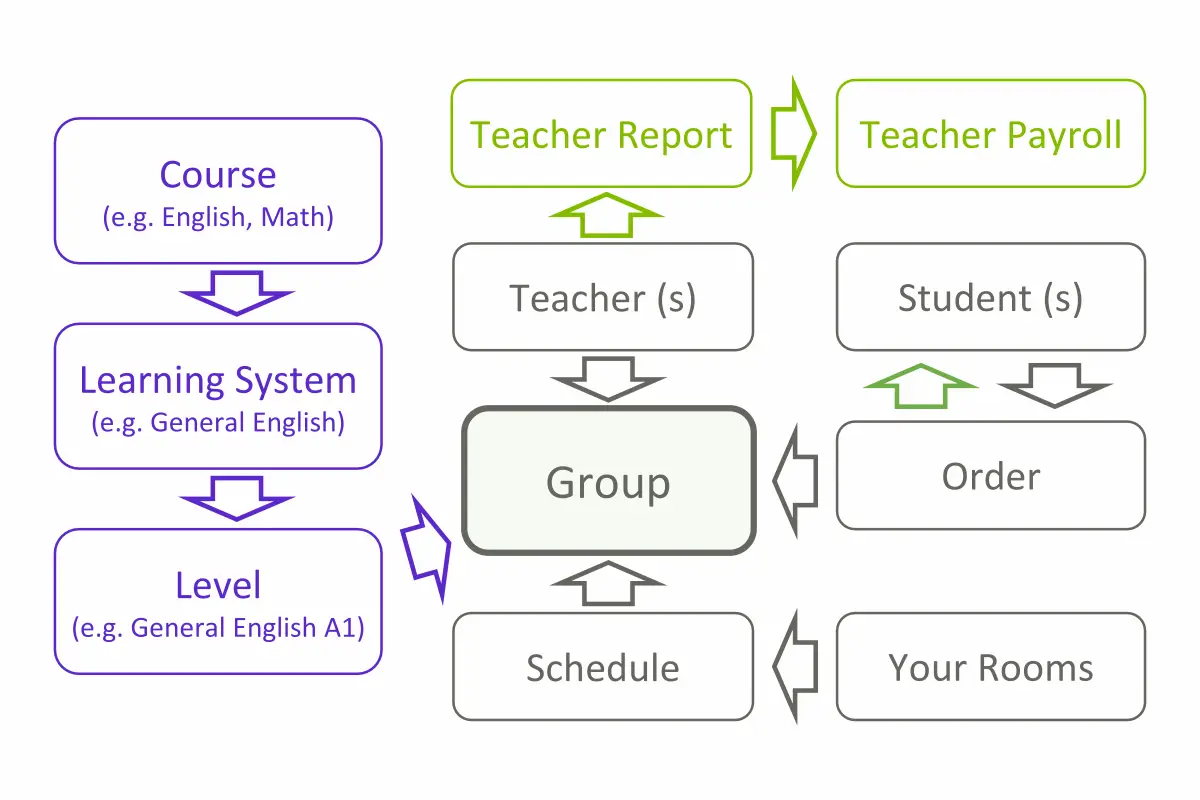
SchoolManage organizes every educational center around two layers: an educational structure (courses, learning systems, and levels) and an operational workflow (schedules, groups, orders, reports, and payroll). Setup is a one-time process that mirrors your school’s business model; after that, daily operations run with minimal manual work.
The essential guide to starting your SchoolManage setup
Your must-read article before getting started
Courses
Define the highest-level educational offering: English, Math, Arts and more. SchoolManage adapts to your subject structure.
Learning Systems
Organize content with unlimited learning systems (e.g., General English, Business English, Kids English) under each course.
Levels
Create specific levels (e.g., General English A1) for every learning system, shaping the educational journey.
Implementation is a one-time process at the start of using SchoolManage. Its goal is to accurately reflect your school’s business model, with settings that rarely need changes afterwards.
All-in-One School Management Implementation
Active Administrator Zone
Create a Schedule
Plan individual and group lessons, assign rooms and teachers, avoid scheduling conflicts — all in one place
Group
The core unit where students, teachers, schedules and payments connect — for individual or multi-student groups
Add Teacher(s) to Group
Multiple teachers, each with their own confidential payment terms
Prices
Flexible price templates for installments and textbooks — making setup faster and easier.
Student Order
Link each student to a group with a personalized billing plan and selected payment method
Student Profile
Each student has a single profile containing all data — orders, payments, attendance, progress, notes — no matter how many enrollments. No duplicate records, no extra work
Submit lesson details in seconds — the base for payroll, progress tracking and feedback to clients. Reports can be entered directly in the mobile app
6 charging options
One-time payment, Installment plan up to 13 payments, Per lesson billing, Attendance-based billing, Subscription, Subscription with discount based on attendance
Filter for Prospective Clients
Smart filters to organize and track prospective clients, send bulk email and SMS notifications and convert leads into enrollments — all in one platform
Due Payment Notifications
Seamless automatic reminders for upcoming payments — tailored to each student’s plan
Tasks with Reminder
Create individual or group tasks with reminders, comments, and reports — keeping admins and teachers on track
Teacher Payroll
Generate accurate teacher payrolls in just 12 seconds — based on the schedule and teacher reports, saving valuable time for school owners.
SchoolManage organizes educational content in three levels: Courses (the broad subject, like English or Math), Learning Systems (variations under a course, like General English or Business English), and Levels (specific stages, like A1 or B2). This structure mirrors how educational centers naturally plan their programs.
What is the difference between a course, a learning system, and a level?
A Course is the highest-level subject offering (English, Math, Arts). A Learning System is a program variation within that course (General English, Kids English). A Level is a specific stage within a learning system (General English A1). Together they define each student’s educational path.
How long does implementation take?
Implementation is a one-time setup at the start. It reflects your school’s business model — courses, pricing, schedules, and roles — and rarely needs changes afterward. Small centers complete it in a few days; larger centers with multiple branches may take longer.
What is a "group" in SchoolManage?
A group is the core unit where students, teachers, schedules, and payments connect. It can hold a single student (individual lessons) or multiple students. Everything — attendance, reports, payroll, billing — flows through the group.
School management software for educational centers